
-
 The BLANKOM EMU-8500 is a professional IPTV encoder that can encode multiple HDMI inputs into IPTV streams, both SPTS and MPTS. A logo and scrolling text can be inserted into each video channel.
-
 The BLANKOM EMU-8600 is a professional IPTV encoder that can encode multiple HDMI inputs into IPTV streams, both SPTS and MPTS. A logo and scrolling text can be inserted into each video channel.
-
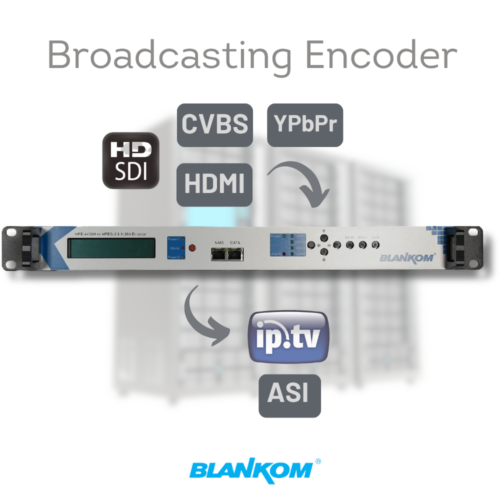 The BLANKOM MPE-4000 family combines two or four HDMI or SDI inputs, H.264/MPEG-2 encoding, ASI remultiplexing and ASI/IP output. Optional redundant power is available for all variants.
-
 The BLANKOM EMU 9500 series IPTV Encoder is a high-quality HD audio and video encoding device with HDMI inputs. Furthermore, it is a streaming device, supporting UDP (SPTS), SRT, RTP, RTSP, RTMP, HTTP, and HLS protocols.
-
 The BLANKOM EMU 8200 series IPTV Encoder is a high-quality HD audio and video encoding device with HD-SDI inputs. It supports UDP (SPTS), RTP, and RTSP protocols.
-
 The BLANKOM MPE-4001 is a broadcast-grade IPTV and ASI encoder with powerful features. It is equipped with multiple video input interfaces (HDMI, SDI, YPbPr and CVBS) and audio input interfaces (AES, BNC, and XLR) to enable compatibility with diverse signal sources and cater to virtually every requirement for an encoding application. Various audio and video encoding formats are available to satisfy diverse requirements. It provides support for two stereo channels to be mixed with the video to generate a stream output. The encoded program will finally output to the ASI and IP ports. The MPE-4001 also has an OSD (logo and caption) insertion function and can display multiple elements at once. The operator can insert advertisement pictures, their own logo, and scrolling text content into the encoding process.
-
 BLANKOM MPE-3000 is a professional audio encoder for broadcasters with dual analog balanced (XLR) and AES/EBU digital audio inputs and an ASI input. The unit has dual ASI outputs and a GigE IP output port over UDP/RTP protocol. Its various audio inputs support dual AES/EBU digital and dual analog stereo balanced (XLR) audio for universal professional needs. A redundant power supply is optionally available. Operation by using the front panel buttons or by the built-in comfortable web interface.
IRENIS GmbH · Nordstemmen, Deutschland
ENENDE
PRODUKTAUSWAHL
IP-Encoder und Streamer
Wählen Sie für Ihre Video- oder Audioquelle den passenden IP-Encoder. Eingangsschnittstelle, Kanalzahl, Auflösung und die vom jeweiligen Modell unterstützten Protokolle bestimmen die Auswahl.
Welcher Encoder passt zu Ihrem Projekt? Vergleichen Sie alle Modelle nach Eingang, Kanalzahl, Codecs, Auflösung und Streamingprotokollen.Encoder-Vergleich öffnen
Mehr über diese Kategorie
Encoder bringen das Ausgangssignal einer Kamera, eines Players oder eines Rechners ins Netz. Das Spektrum reicht vom Einzelkanalgerät bis zu 24 Kanälen in einer Rackeinheit.
Wählen Sie zunächst den Eingang. Für HDMI reicht das Angebot von HDE-264 und HDE-265L mit einem Kanal über die 4K-Modelle HDE-275, HDE-275Q und HDE-276 bis zum 16-Kanal-Gerät HDE-16265 und zum HDE-4275Q. Für SDI stehen der SDE-265, der 16-Kanal-SDE-16265 sowie die Broadcast-Modelle SHDE-4000 und SHDE-400 mit 12G-SDI bei 4Kp60 zur Verfügung. Der DPE-275 verarbeitet DisplayPort, der VDE-265 VGA. ADE-264B und ADE-16264 nehmen neben HDMI auch analoges CVBS an. Die Familien EMU-8200, EMU-8500, EMU-8600 und EMU-9500 bündeln 4 bis 24 Kanäle in einem Gehäuse.
Alle Videomodelle codieren H.264, die meisten auch H.265. Die Konfiguration erfolgt im Browser. UDP/RTP steht durchgängig zur Verfügung. SRT, RTMP(S) und HLS unterstützen die meisten Streaming-Encoder. Bei Kopfstellen-Encodern hängt die Unterstützung vom Modell ab. Der IP-Encoder-Vergleich zeigt die Unterschiede. Die Lizenzkosten sind im Gerätepreis enthalten.
Nennen Sie uns Quelle, Ziel und Kanalzahl. Wir empfehlen Ihnen das passende Modell.
Passenden Encoder finden
Nennen Sie uns Quellschnittstelle, Videoformat, Ziel und Kanalzahl.

IRENIS GmbH
Hauptstrasse 29
31171 Nordstemmen, Deutschland
+49 5069 480 97 81
[email protected]
Internationale Bestellungen werden aus unserem Hauptlager in Deutschland und aus den Lagern unserer Distributoren in der Türkei und China versendet.
Produkte
IRENIS Kabel
Anwendungen
© 2013–2026 IRENIS GmbH · BLANKOM® und IRENIS® sind eingetragene Marken