
IPTV System Design
BLANKOM Engineering Guide Series
GUIDE 10 / 12
HDMI/SDI SOURCES · ENCODING · TRANSCODING · IP DECODING
Integrate Local Video Sources:
Encoding, Transcoding and IP Decoding
Bring local HDMI/SDI content into the IPTV system, adapt existing IP streams only when a real processing need exists, and decode selected streams back to baseband where displays, monitoring or broadcast equipment require it.
01 · DEFINE THE PROCESSING JOB
Encoding, transcoding and decoding solve different problems
The planning guide treats encoders, transcoders and decoders as separate functions. Encoders insert own sources such as hotel information, restaurant, gym, spa, cameras or presentation/playout into the IPTV system. Transcoding is used when an existing stream must be adapted, for example because bandwidth is constrained. Decoders perform the opposite conversion when an IP stream has to return to a baseband output such as SDI for monitoring or downstream equipment.[1, pp. 54–58]
| Function | Typical input | Typical output | Use it when |
|---|---|---|---|
| Encode | Local HDMI/SDI video source | IP stream for the IPTV network | Own content has to become part of the channel line-up |
| Transcode | Existing IP transport stream | IP stream with changed codec, bit rate or packaging | Network, middleware or endpoint constraints make the received format unsuitable |
| Decode | Selected IP stream | SDI or other supported baseband output | A monitor wall, broadcast device or local screen path needs baseband video |
02 · INSERT YOUR OWN CONTENT
Encode local sources into the same IPTV distribution system
The source guide gives hotel TV, restaurant, gym, spa, camera and presentation/playout as examples of locally generated content that may need to be encoded. Its application drawing also shows broader encoder-streamer use cases such as surveillance, digital signage, workstations and monitoring.[1, pp. 54–55]
For an IPTV project, record each local source separately. The physical input, source resolution, required output codec, target resolution/frame rate, audio requirement and destination transport all affect the equipment choice. Do not describe the requirement merely as “one encoder”.
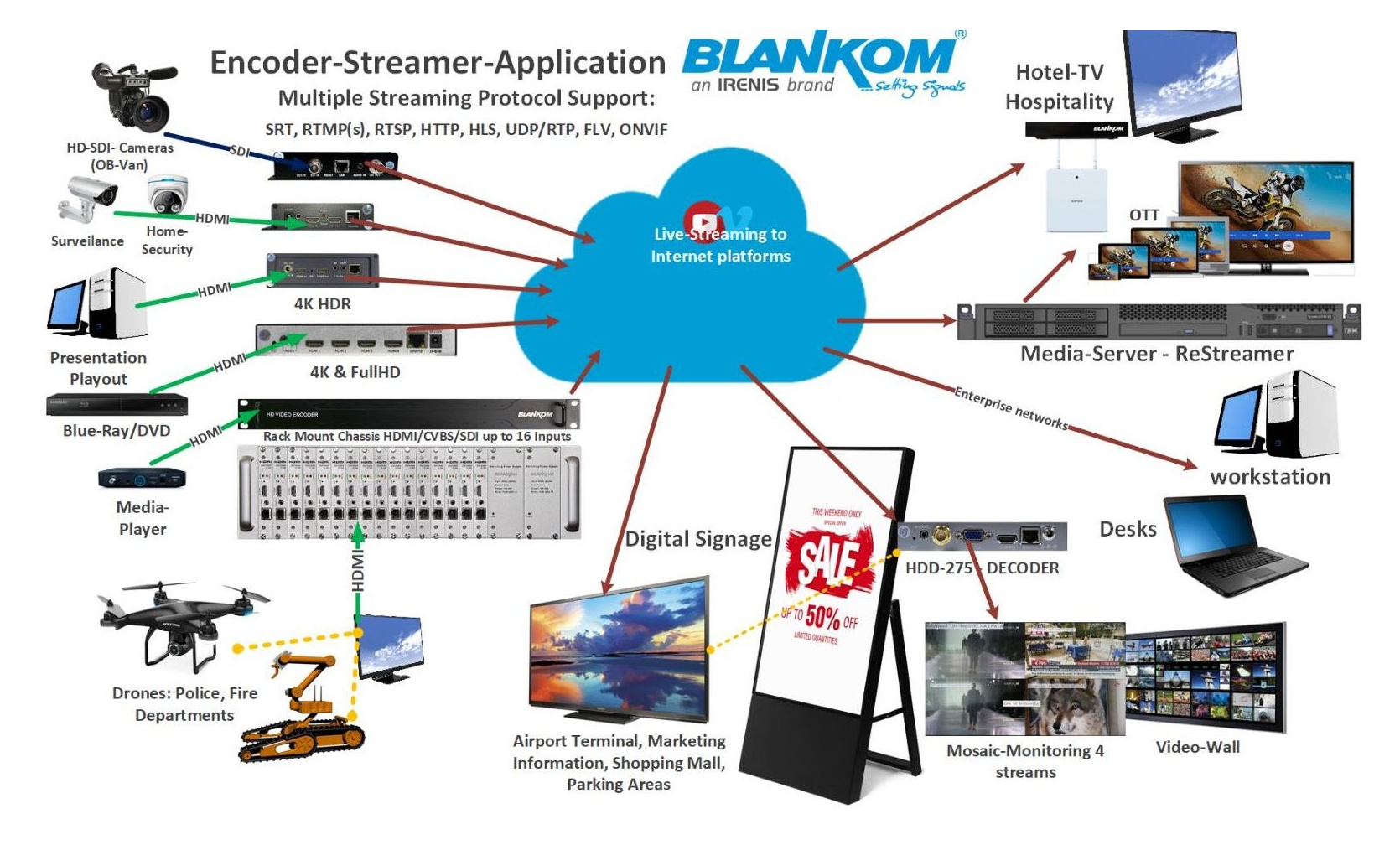
Figure 1. Encoder-streamer application examples reproduced from IPTV Headend Planning Guide, 2nd edition (2026), Figure 18.2, p. 55. Treat product labels in the historical source drawing as examples; verify current models separately.
SOURCE
What enters?
Interface, resolution, frame rate, audio, HDCP/content constraints where applicable, and whether the signal is always present.
PROCESSING
What must change?
Codec, resolution, bit rate, audio format, overlays or other project-specific processing only if required.
DELIVERY
Where does it go?
Local multicast IPTV, point-to-point stream, another site, decoder, recorder, middleware or another defined destination.
03 · MATCH INTERFACES AND OUTPUTS
Specify the encoder by source and required stream behaviour
The planning guide distinguishes compact multi-protocol encoder-streamers from headend encoders that mainly use UDP/RTP, with some supporting RTSP/RTP. It gives MPE-series SDI/HDMI products as broadcast-grade examples, while explicitly identifying the pictured MPE-4000 as end-of-life and naming MPE-4001 as its successor.[1, pp. 54–55]
Use the image as a historical source example, not as a current product specification. The quotation must be based on the current product page/datasheet and the exact input/output requirement.

Figure 2. MPE-series encoder example reproduced from the source guide, Figure 18.3, p. 55. The guide states that the shown MPE-4000 is end-of-life and identifies MPE-4001 as its successor.
| Encoder selection input | What to document | Why it matters |
|---|---|---|
| Physical source | HDMI, SDI or other verified interface; number of simultaneous inputs | Defines the hardware input stage and channel density |
| Video requirement | Input and required output resolution/frame rate; required codec | Defines whether simple encoding or additional scaling/transcoding is needed |
| Audio | Embedded/separate audio and required output format | Prevents a video-only specification from hiding audio conversion needs |
| Transport | Required destination protocol and unicast/multicast role | Must match the delivery plan in Guide 09 |
| Concurrent outputs | Number of output streams/profiles actually required | Must be verified for the exact model and revision |
04 · RETURN IP TO BASEBAND WHEN NEEDED
Use an IP decoder where the downstream equipment does not consume the stream directly
The source guide describes modular IP-to-HD-SDI decoders as the counterpart to the encoders and notes that IP decoders with a mosaic view can also serve monitoring applications. Its generic application flow also shows decoding back to SDI/HDMI for monitor-wall or broadcast-equipment use.[1, pp. 54–55]
For a quotation, define the input stream and the required physical output explicitly. Do not infer HDMI, SDI count, codec support or output resolution from another model in the family.

Figure 3. Modular IP-to-HD-SDI decoder example reproduced from IPTV Headend Planning Guide, 2nd edition (2026), Figure 18.4, p. 55. Exact current model capability must be checked separately.
STREAM SIDE
Define what the decoder receives
Transport, destination address/port, codec, resolution, audio and the expected service/table structure.
BASEBAND SIDE
Define what the equipment needs
SDI/HDMI or other verified interface, output resolution, audio path, number of simultaneous outputs and monitoring requirements.
05 · CHANGE THE STREAM ONLY WHEN REQUIRED
Transcode for a defined bandwidth, codec or endpoint constraint
The planning guide uses bandwidth-constrained hospital bed terminals and shared corporate networks as examples where transcoding may be needed. It describes changing video/audio codecs and bit rate, and notes that the BTR-6000V can also accept a complete MPTS, select individual services, transcode them, output SPTS or a new MPTS, and multiplex services into an MPTS.[1, pp. 56–57]
Before specifying a transcoder, identify the reason for conversion. If the objective cannot be stated—bandwidth, codec compatibility, middleware capability, target bit rate or another concrete requirement—the transcoding stage is not yet justified.

Figure 4. IP-to-IP transcoder example reproduced from the source guide, Figure 19.1, p. 56. The guide identifies BTR-6000V as the current version of the example platform; verify the current datasheet before specification.
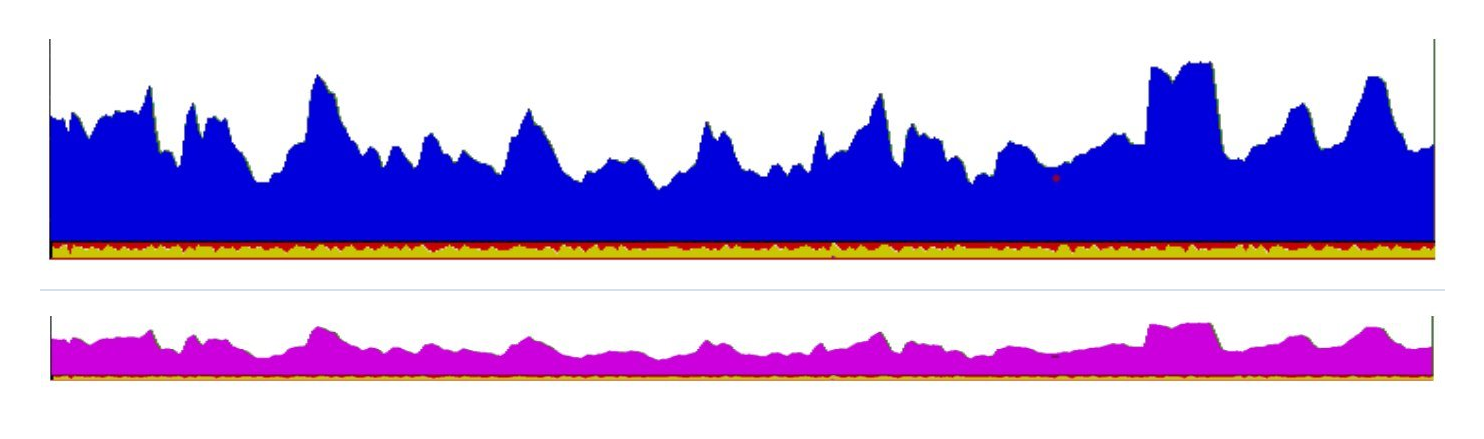
Figure 5. Example bit-rate traces before and after transcoding, reproduced from Figures 19.3 and 19.4, p. 57.
06 · KEEP THE DECODER INFORMATION INTACT
A usable SPTS needs more than video and audio packets
The source guide defines a minimal SPTS as carrying PAT, PMT, SDT, optionally TDT, video including PCR and one or more audio streams. It also explains that the tables tell the receiver about codec, resolution, aspect ratio, chroma format, bit depth, audio mode, sampling rate and PCR information.[1, pp. 57–58]
This matters whenever encoding or transcoding changes the stream. Commissioning should check not only whether a picture appears, but whether the resulting stream still contains the information required by the target decoder.
PROGRAMME MAP
PAT + PMT
The receiver must be able to identify the service and the PIDs carrying its elementary streams.
SERVICE DATA
SDT + optional time data
Service identity and, where required, time information must remain coherent after processing.
ESSENCE + CLOCK
Video + PCR + audio
The media streams and timing information must match the decoder’s supported formats and the intended output.
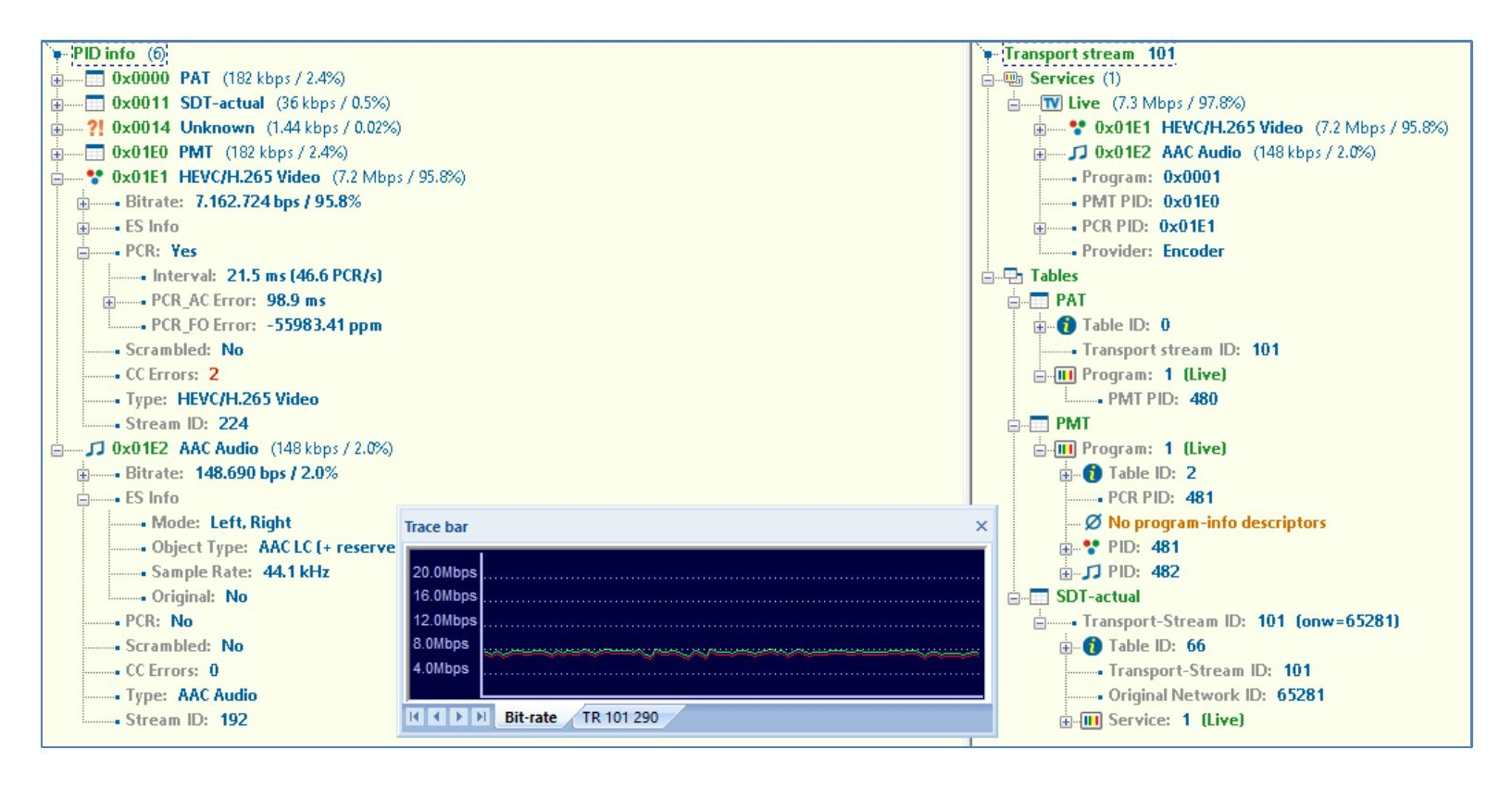
Figure 6. Analyser view of a minimal SPTS, reproduced from the source guide, Figure 19.6, p. 57.
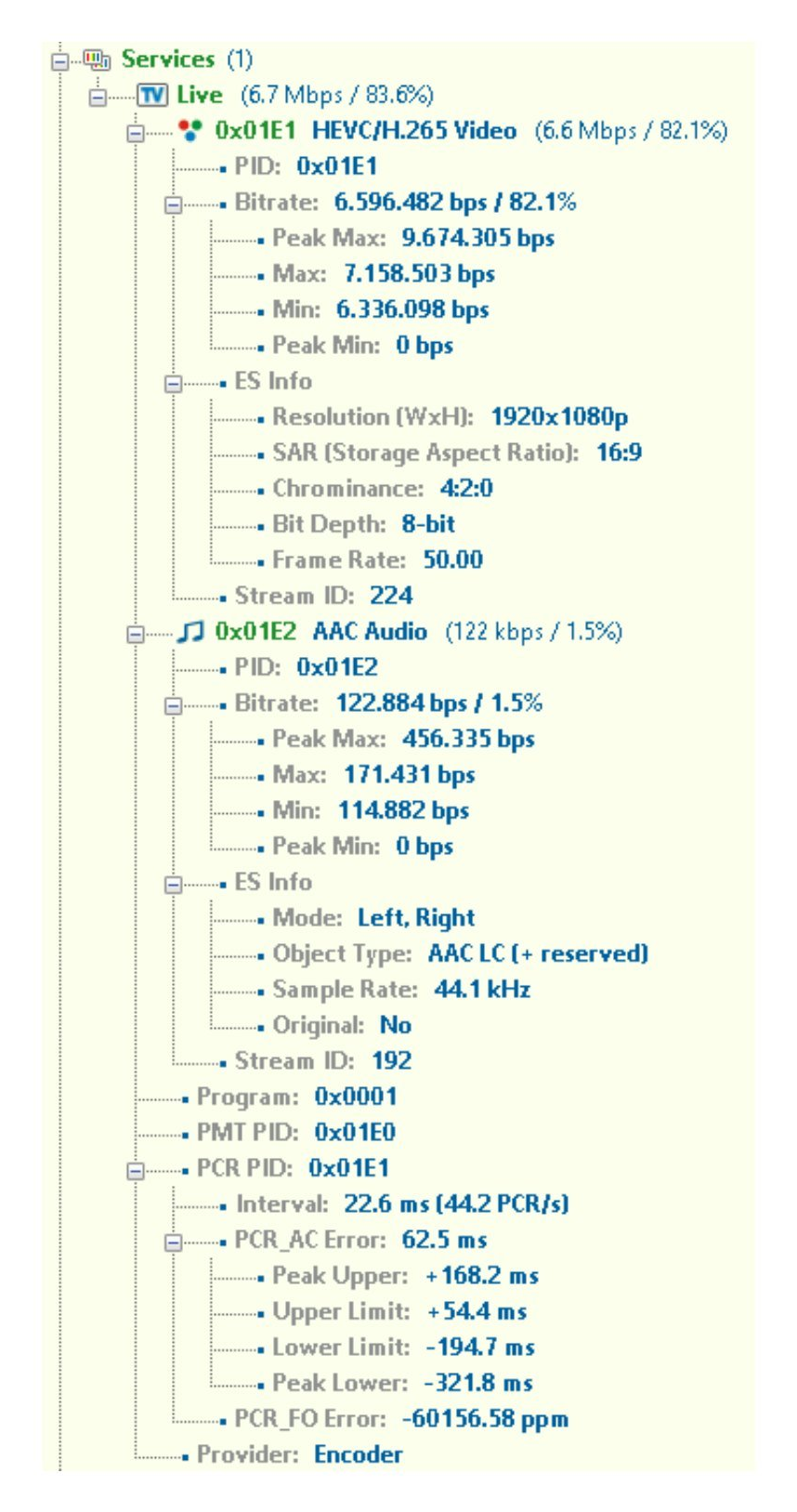
Figure 7. Table details used by the decoder, reproduced from Figure 19.7, p. 58.
07 · TURN SOURCES INTO A SPECIFICATION
Use one processing record for every source or conversion path
-
Identify the source
Name it and record whether it is HDMI/SDI baseband, SPTS, MPTS or another verified IP source.
-
Record the source parameters
Interface, codec, resolution, frame rate, audio, transport, service count and bit rate where applicable.
-
State the required destination
IPTV multicast, another unicast destination, monitor wall, SDI/HDMI equipment, middleware or another defined endpoint.
-
List only the transformations required
Encoding, scaling, codec conversion, bit-rate reduction, demultiplexing/multiplexing or decoding. Leave unnecessary processing out.
-
Verify the resulting stream or baseband output
Check picture, audio, timing, table information and endpoint compatibility on the actual intended receiver path.
-
Document the final configuration
Keep the source-to-output mapping with the quotation and commissioning record so later changes can be traced.
CUSTOMER REFERENCE
Explain why each processing stage appears in the quotation
A quotation should let the customer distinguish source acquisition from optional or necessary processing. Link directly to this guide when the proposal includes local encoders, an IP transcoder or a decoder stage.
“The proposed encoder/transcoder/decoder stage is included because the defined source and destination formats are not directly compatible. Please refer to BLANKOM Engineering Guide 10 for the processing roles and the information required to confirm the final configuration.”
08 · SEND THE PROCESSING DATA
What to include in your encoding / transcoding / decoding RFQ
Send one line per source or stream. Where a parameter is unknown, mark it “to be confirmed” rather than guessing.
The most useful enquiry identifies what enters the system, what must change and what the destination equipment expects.
The request opens the existing IRENIS / BLANKOM enquiry page. Exact model capability and included functions will be confirmed for your project.
Processing brief outline
IPTV PROCESSING BRIEF
Application / project:
Quantity of sources or streams:
Role: encode / transcode / decode:
Input interface or transport:
Input codec / resolution / frame rate:
Input audio:
SPTS or MPTS:
Required output interface or transport:
Required output codec / resolution / frame rate:
Target bit rate:
Unicast or multicast destination:
Number of simultaneous outputs:
Endpoint / TV / STB / decoder model:
Need demux / mux:
Need overlays or local graphics:
Monitoring / recording destination:
Open questions:
Reference: IPTV System Design - Guide 10, BLANKOM
FAQ
Common planning questions
Do I need a transcoder for every IPTV system?
No. The source guide presents transcoding as a response to a defined constraint such as bandwidth or format compatibility. If the received stream already matches the distribution network and endpoint requirements, the transcoding stage may not be needed.
Can one encoder specification be reused for every HDMI/SDI source?
Not safely. Record the physical interface, resolution/frame rate, audio, output codec, transport and number of simultaneous streams for the actual source. Verify the exact encoder model against those requirements.
Why do the PSI/SI tables matter after transcoding?
The decoder needs programme, codec and timing information in addition to the media packets. The source guide identifies PAT, PMT, SDT, optional TDT, video/PCR and audio as the minimum SPTS content.
When would I use an IP decoder?
When the selected IP stream must return to a physical video interface for downstream equipment, a monitor wall or another baseband workflow. The exact supported output interfaces and number of channels must be verified per model.
SOURCE BASIS
Primary engineering source
This guide reformulates Chapters 18 and 19 of Ralf Riedel’s published 2026 second edition. The role-comparison table, processing-record workflow, quotation-reference wording and RFQ structure are editorial engineering tools added for the web series; they are not product specifications.
- Ralf Riedel — IPTV Headend Planning Guide, 2nd edition (2026)
Primary scope: Chapter 18, pp. 54–55 for local-source encoding and IP decoding; Chapter 19, pp. 56–58 for transcoding, minimum SPTS content and decoder information.
Document reference: BLANKOM-EG-IPTV-10 · Web revision 1.0
IPTV System Design · BLANKOM Engineering Guide Series
- Requirements and ArchitectureGuide 01
- Services, Transponders and Tuner CountsGuide 02
- SAT-IF DistributionGuide 03
- IPTV Headend SelectionGuide 04
- Pay-TV IntegrationGuide 05
- DVB Transport Stream ValidationGuide 06
- EPG / EIT Processing and Receiver ValidationGuide 07
- IPTV Multicast Network DesignGuide 08
- IPTV Stream DeliveryGuide 09
- Local Video SourcesGuide 10
- IPTV Endpoints and ServicesGuide 11
- Resilience and OperationsGuide 12
© 2022–2026 BLANKOM, IRENIS GmbH. All rights reserved. Technical details, product names and compatibility are subject to change. Verify current product documentation and project-specific requirements before specification or purchase.
