
IPTV System Design
BLANKOM Engineering Guide Series
GUIDE 09 / 12
MULTICAST ADDRESSING · UDP/RTP PORTS · WAN/LAN INTERWORKING · IP GATEWAYS
Plan IPTV Stream Delivery:
Multicast Addresses, UDP/RTP Ports and IP Gateways
A stream is not fully specified by its service name. Define where it comes from, which transport carries it, which multicast group and UDP/RTP port identify it on the LAN, and whether an IP-to-IP gateway must adapt an external unicast source before local distribution.
01 · DOCUMENT THE DELIVERY PATH
Build a stream map before assigning addresses
The planning guide separates the media service from the way it is transported. For local IPTV, the stream normally leaves the headend over UDP, optionally with RTP, and a multicast service is identified by its destination group plus its destination port. External live sources may arrive through different unicast transports and require an IP-to-IP gateway before they join the local multicast plan.[1, pp. 47, 52–53, 74, 77–79]
Do not start by typing addresses into devices. First create one row per required output stream and record the source, transport direction and destination. That table becomes the reference for the headend, switches, receivers, commissioning records and quotation.
| Field | Example content | Why it matters | Verification |
|---|---|---|---|
| Service | Named TV/radio service or external live source | Keeps the stream map tied to the required programme, not only to an IP address | Match the source/service ID and the receiver channel list |
| Input transport | DVB-derived SPTS, SRT, RTMP(S), HTTP/HLS, UDP/RTP | Determines whether direct distribution or protocol interworking is required | Confirm the actual source, role and access method |
| Destination group | 239.x.y.z | Identifies the multicast group used by the LAN receivers | Check that the group is unique in the project plan |
| Destination port | e.g. 10000, 10002, 10004 for a simple RTP plan | Separates streams at the receiving host and avoids ambiguous reuse | Check for conflicts with existing services and ephemeral ranges |
| Output transport | UDP or RTP over UDP | Defines packetisation and receiver expectations | Test on the actual TV/STB/decoder |
| Bit rate | Measured or design stream bit rate | Links the stream map to Guide 08 bandwidth calculations | Measure representative output traffic |
02 · ASSIGN THE MULTICAST GROUPS
Use a controlled address plan from the administratively scoped range
The planning guide recommends the administratively scoped range 239.0.0.0/8 for private IPTV distribution and explicitly warns against using 224.0.0.x, which is reserved for local control and discovery traffic.[1, pp. 47, 74–75]
For a project, assign one documented multicast group per service and keep the sequence understandable. The IP address is an engineering identifier, not a service name; keep both in the stream map so later changes can be audited.
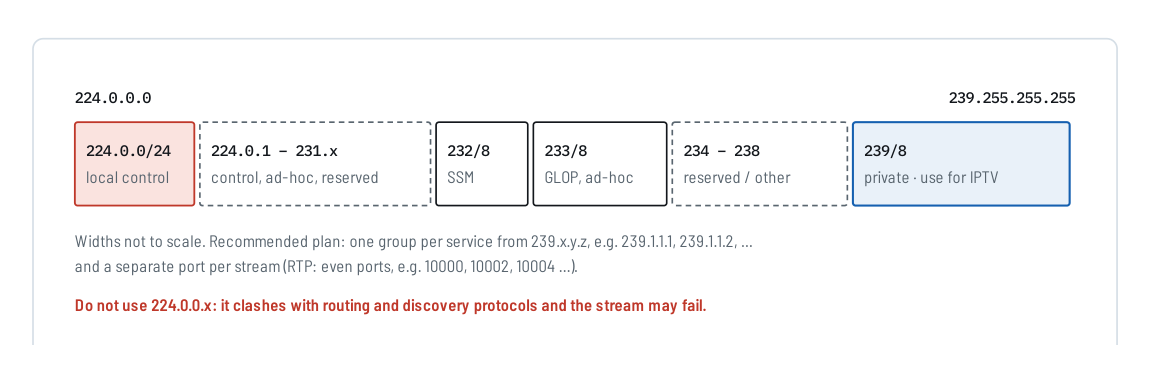
Figure 1. IPv4 multicast address space. The source guide recommends 239.0.0.0/8 for private IPTV use and warns against 224.0.0.x. Reproduced from IPTV Headend Planning Guide, 2nd edition (2026), Figure A.1, p. 74.
GOOD PRACTICE
One planned group per service
Keep a master stream map with the service name, multicast group, port, transport and source. Do not rely on device screenshots as the only record.
SEPARATE
Media groups from management addresses
The planning guide explicitly distinguishes multicast stream addressing from the private/public addressing used for device management. Keep both plans documented and do not mix their purpose.
03 · PLAN THE DESTINATION PORTS
Choose unique ports deliberately; avoid well-known and ephemeral ranges
Appendix B divides the UDP port space into system/well-known ports (0–1023), user/registered ports (1024–49151) and dynamic/private ports (49152–65535). It recommends choosing IPTV ports from the middle range, preferably 5004 and above, while avoiding conflicts with existing applications and operating-system ephemeral ranges.[1, pp. 77–78]
The same source also recommends a different UDP destination port for every stream, even when the multicast group addresses differ. A simple project convention can use a documented block such as 10000–10998; if RTP is used, even destination ports provide a conventional base for the RTP/RTCP pair.
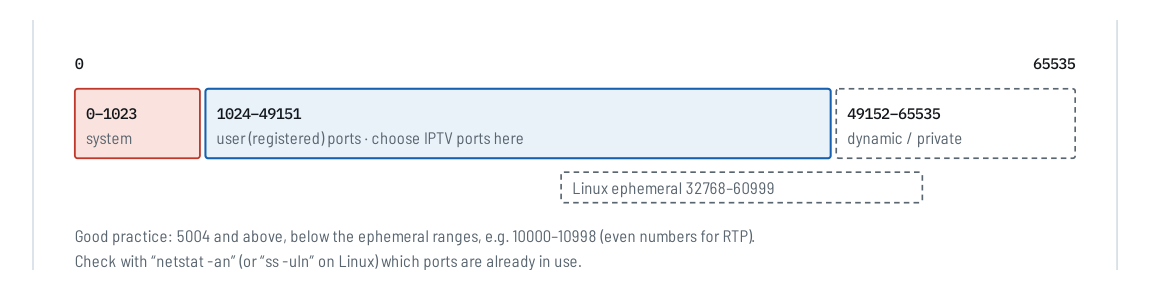
Figure 2. UDP port ranges and a practical IPTV planning area. Reproduced from IPTV Headend Planning Guide, 2nd edition (2026), Figure B.1, p. 77.
| Port rule | Engineering use | Check before release |
|---|---|---|
| 0–1023 | Do not use for normal IPTV stream planning | These are system / well-known ports |
| 1024–49151 | Choose an unused project block here | Confirm that selected ports are not assigned to another local service |
| 49152–65535 | Avoid as a default IPTV plan | This is the IANA dynamic/private range and overlaps common ephemeral use |
| RTP | Use even destination ports in a conventional pair plan | Corresponding RTCP normally uses the next higher odd port |
04 · UNDERSTAND WHAT IS ON THE WIRE
UDP carries the transport stream; RTP is an optional additional layer
The source guide uses the common IPTV example of seven 188-byte MPEG transport-stream packets per IP packet: 7 × 188 = 1316 bytes of TS payload. UDP contributes an 8-byte header, while RTP—when used—adds sequence-number and timestamp information in an additional header.[1, pp. 77–78]
For system design, the practical decision is whether the source and receiver expect plain UDP transport-stream delivery or RTP over UDP. Do not assume that selecting “RTP” on one device guarantees interoperability with every receiver; verify the actual endpoint and packet behaviour.
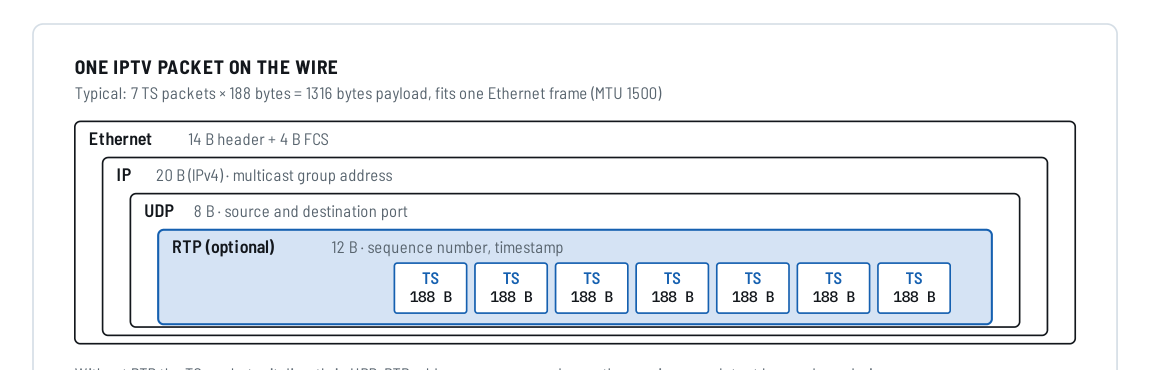
Figure 3. Typical IPTV packet structure: TS packets inside optional RTP, UDP, IP and Ethernet. Reproduced from IPTV Headend Planning Guide, 2nd edition (2026), Figure B.3, p. 78.
MEDIA
MPEG transport stream
The compressed service and its signalling remain in the TS payload.
TRANSPORT
UDP destination
The destination group and destination port identify where the packet is delivered in the multicast plan.
OPTIONAL
RTP information
RTP adds sequence and timing information that a compatible receiver can use to detect loss and reordering.
05 · INTERWORK WAN AND LAN
Use an IP-to-IP gateway when the source transport does not match the LAN
The planning guide describes external live streams arriving as RTMP, HTTP or increasingly SRT, while the managed local IPTV network distributes services as multicast. Its example uses an IP-to-IP gateway to terminate or adapt the incoming stream and deliver a multicast output into the IGMP-managed LAN.[1, pp. 52–53]
The engineering requirement is therefore not simply “support SRT” or “support HLS”. Define the exact input-to-output direction, source access method, media compatibility, stream count, target multicast map and endpoint. Protocol names alone do not prove that every source can be converted to every output.

Figure 4. External unicast sources converted or adapted for managed LAN multicast distribution. Reproduced from IPTV Headend Planning Guide, 2nd edition (2026), Figure 17.1, p. 52. Product names shown in the source are examples; verify the current model configuration.
| Gateway input | Information to collect | Output-side decision |
|---|---|---|
| SRT | Connection role, address/port, passphrase/encryption if used, latency/recovery settings, codec/container | Required LAN transport, multicast group/port and receiver compatibility |
| RTMP(S) | Server/URL, publishing or pull behaviour, authentication and media format | Supported gateway direction and target stream map |
| HTTP / HLS | Direct media URL, access/authentication, playlist/segment behaviour and codec compatibility | Whether the selected gateway can ingest that source and create the required LAN output |
| UDP/RTP | Source/destination addressing, port, unicast/multicast mode and payload format | Re-address, repacketise, filter or otherwise adapt only the functions verified for the selected product |
06 · COMMISSION THE STREAM MAP
Test addresses, ports and conversion direction on the real endpoints
Commissioning should prove that the documented map matches the running system. The source guide provides the address and port rules; the sequence below is an editorial test workflow for the web series.
-
Verify the source
Confirm that the expected service or external stream is present, reachable and stable before changing the delivery path.
-
Check uniqueness
Confirm that no two services unintentionally use the same destination group and port combination, and that the selected UDP ports do not conflict with local services.
-
Verify the gateway direction
For external sources, confirm the exact input protocol and required output protocol; check the selected gateway model and firmware for that direction.
-
Join from the real receiver
Use the intended TV, STB, decoder or test client to join the planned multicast group and validate picture, audio and service signalling.
-
Check the network path
Confirm IGMP join/leave operation and absence of unintended multicast flooding using the Guide 08 network design.
-
Record the final map
Freeze the as-built source, transport, destination group, port, device and endpoint information so maintenance staff do not have to reconstruct it later.
CUSTOMER REFERENCE
Explain the delivery map in the quotation
Use this section when the customer needs to understand why the quotation includes particular gateway functions, multicast addressing or stream-port assignments.
“The proposed IPTV stream-delivery plan assigns each service a documented transport, multicast group and destination port. External WAN sources that do not already match the managed LAN delivery method are adapted through the specified IP-to-IP gateway. Please refer to BLANKOM Engineering Guide 09 for the addressing, UDP/RTP port and gateway-integration principles used in this proposal.”
07 · DEFINE THE STREAM INTERWORKING
What to include in your stream-delivery RFQ
Send the actual source protocols and representative stream details, not only a list of protocol names.
The most useful request identifies source location, input protocol and role, media format, stream count, bit rates, required output transport, multicast address/port plan, receiver models and conversion direction.
The request opens the existing IRENIS / BLANKOM enquiry page. Exact gateway support, capacity and firmware functions are confirmed for the proposed configuration.
Project brief outline
IPTV STREAM DELIVERY PROJECT BRIEF
Country / installation location:
Number of streams:
Source location(s): LAN / WAN / internet / remote site

Input protocol per source:
SRT role / address / port / encryption:
RTMP(S) URL / authentication:
HTTP/HLS direct media URL / access:
UDP/RTP source address / port:
Video / audio codecs:
Bit rate per stream:

Required output transport: UDP / RTP / other
Multicast group plan:
Destination port plan:
RTP/RTCP convention if used:
Destination receiver / decoder / TV / STB:

Required IP-to-IP conversion direction:
Filtering / remultiplexing required:
Transcoding required: yes / no / unknown
Existing gateway equipment to retain:
Network responsibility / integrator:
Required commissioning / acceptance test:
Quantity / timing / open questions:
Reference: IPTV System Design - Guide 09, BLANKOM
ENGINEERING FAQ
Questions that matter in IPTV stream delivery
Which multicast range should we use for a private IPTV LAN?
The planning guide recommends the administratively scoped range 239.0.0.0/8 and warns against using 224.0.0.x for normal IPTV service assignment.
Can several multicast streams use the same UDP port?
The source guide recommends a different UDP destination port for every stream even when the multicast group addresses differ. This simplifies filtering at the receiving host and reduces ambiguity.
Which UDP ports should we choose?
The planning guide recommends choosing unused ports from 1024–49151, preferably 5004 and above and outside ephemeral ranges. A documented project block such as 10000–10998 can be practical if it does not conflict with local services.
Does RTP always require the next odd RTCP port?
That is the conventional pair when one base port is used. The guide’s RFC 3550 summary notes that explicitly signalled separate RTP and RTCP ports may use other values, although even/odd pairing remains encouraged.
When do we need an IP-to-IP gateway?
When the source transport or delivery method does not match what the destination network or receiver requires. A common example is a WAN unicast source that must be delivered as managed multicast inside the local IPTV LAN.
Does an IP gateway change H.264 into H.265?
Not unless the selected product includes a verified transcoding function. Protocol interworking and transcoding are separate functions.
SOURCE BASIS
Primary engineering source
This guide reformulates the addressing, port-planning and IP-gateway sections of Ralf Riedel’s published 2026 second edition. The stream-map table, commissioning sequence, RFQ structure and quotation-reference wording are editorial engineering tools added for the web series; they are not product specifications.
- Ralf Riedel — IPTV Headend Planning Guide, 2nd edition (2026)
Primary scope: Chapter 15, pp. 47–48 for multicast stream addressing; Chapter 17, pp. 52–53 for WAN unicast to LAN multicast interworking; Appendix A, pp. 74–76 for multicast address ranges; Appendix B, pp. 77–79 for UDP port selection, packet structure and RTP/RTCP port pairing.
Document reference: BLANKOM-EG-IPTV-09 · Web revision 1.0
IPTV System Design · BLANKOM Engineering Guide Series
- Requirements and ArchitectureGuide 01
- Services, Transponders and Tuner CountsGuide 02
- SAT-IF DistributionGuide 03
- IPTV Headend SelectionGuide 04
- Pay-TV IntegrationGuide 05
- DVB Transport Stream ValidationGuide 06
- EPG / EIT Processing and Receiver ValidationGuide 07
- IPTV Multicast Network DesignGuide 08
- IPTV Stream DeliveryGuide 09
- Local Video SourcesGuide 10
- IPTV Endpoints and ServicesGuide 11
- Resilience and OperationsGuide 12
© 2022–2026 BLANKOM, IRENIS GmbH. All rights reserved. Technical details, product names and compatibility are subject to change. Verify current product documentation and project-specific requirements before specification or purchase.
