
IPTV System Design
BLANKOM Engineering Guide Series
GUIDE 11 / 12
STB · HOSPITALITY TV · MIDDLEWARE · DIGITAL SIGNAGE
Select IPTV Endpoints and Services:
TVs, STBs, Middleware and Signage
Choose the client device and service tier together. A basic linear endpoint can be simple, but future middleware, digital-signage and interactive-service plans must be considered before TVs or set-top boxes are purchased.
01 · START WITH THE VIEWER EXPERIENCE
The client device decides what the user actually sees
The source guide separates simple set-top-box operation, digital signage and middleware-driven hospitality services. It also warns that hospitality TVs and STBs should be chosen with later middleware compatibility in mind, not only for the functions required on day one.[1, pp. 62–66]
| Endpoint role | What the viewer needs | Planning implication |
|---|---|---|
| Basic linear TV | Channel zapping from a defined service list | A middleware server may not be required; confirm the TV/STB can join and decode the required streams |
| Hospitality TV / managed STB | Portal, EPG, information channels, PMS integration or other managed services | Check middleware/API/app compatibility before selecting the endpoint |
| Digital signage | Configured content immediately after start-up | Define DHCP, channel list, first multicast group and no-portal start behaviour |
| Premium / interactive | VoD, PVR, timeshift, OTT/multiscreen and richer guest services | One or more servers and compatible client software may be required |
02 · DEFINE START-UP BEHAVIOUR
Digital signage should start directly into the intended content
The source guide describes a simple signage endpoint: it receives an IP address from DHCP, has one or a few multicast addresses configured, joins the first group and displays that content full-screen. The required behaviour is explicit: after power-up, the device should not stop at an interactive portal or menu.[1, pp. 62–63]
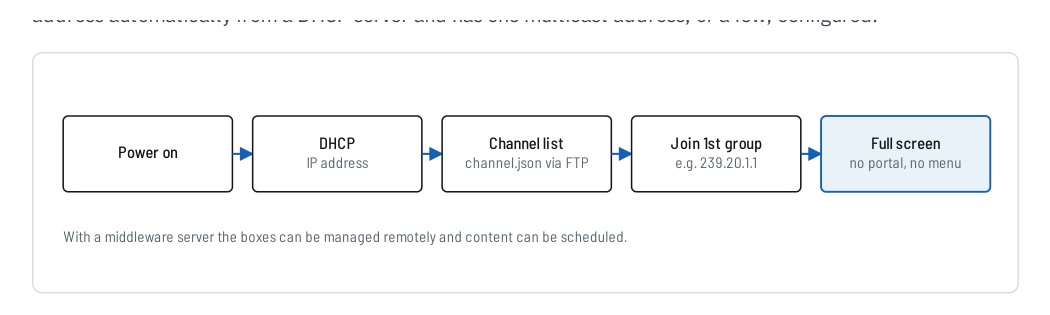
Figure 1. Digital-signage start-up sequence reproduced from IPTV Headend Planning Guide, 2nd edition (2026), Figure 21.1, p. 62.
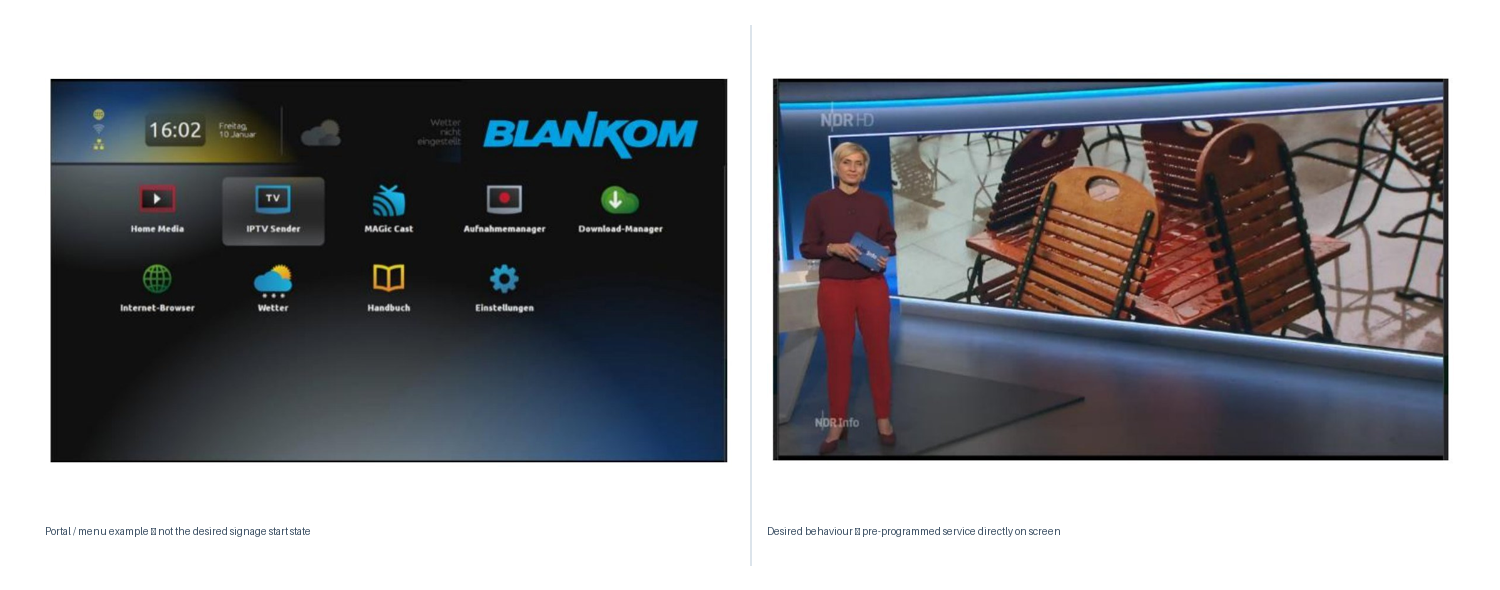
Figure 2. Source-guide examples corresponding to Figures 21.2 and 21.3, p. 63: an interactive portal is not the desired start state for simple signage; the configured programme should appear directly.
NETWORK
Get an address
Define DHCP or the approved addressing method and confirm the endpoint receives network configuration after restart.
CHANNEL LIST
Know what to join
Define the multicast group or channel list and how it is provisioned to the endpoint.
START STATE
Show the intended content
Confirm that power restoration returns to the required service without an unwanted portal or manual intervention.
03 · CHOOSE THE CLIENT DEVICE
Set-top boxes and hospitality TVs differ in capability, management and future options
The planning guide states that STBs differ widely in chipset, features and price. It gives the OmniscreenTV M15 and BLANKOM 6800+ as endpoint examples for linear IPTV/digital-signage use, and Amino-based boxes as examples used with the OmniscreenTV middleware server. It also notes that server size and model depend on the installed features and storage.[1, pp. 62–63]
These illustrations are source-guide examples, not a current compatibility or procurement list. For a new project, verify the current device, firmware, codec support, management method and middleware compatibility before specification.
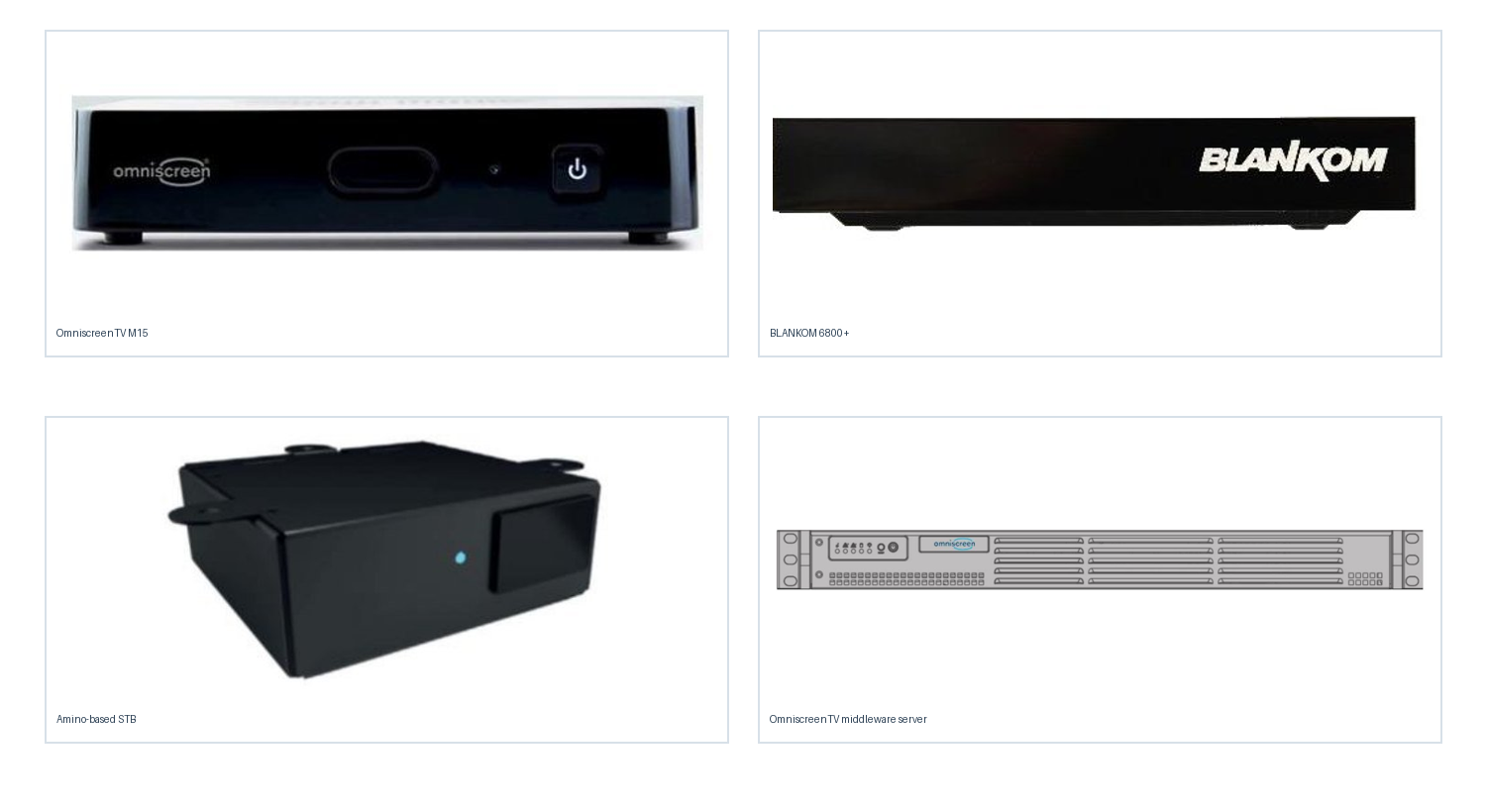
Figure 3. Endpoint examples reproduced from source-guide Figures 21.4–21.7, p. 63. Treat these as historical/source examples; verify current products and compatibility separately.
| Selection field | What to verify | Reason |
|---|---|---|
| Stream compatibility | Codec, resolution, audio, transport and multicast behaviour | The endpoint must decode the actual streams produced by the system |
| Channel provisioning | Local channel list, remote provisioning, app or middleware method | Determines installation effort and future manageability |
| Remote management | Whether central control is required and supported | Important for signage, large installations and later changes |
| Middleware path | API/app compatibility with the planned middleware | A basic endpoint may not support an interactive system added later |
| Physical installation | TV-integrated client versus external STB, mounting, IR/control and cabling | Affects room installation and serviceability |
04 · VERIFY COMPATIBILITY BEFORE PROCUREMENT
The source list is a historical reference—not a current purchasing guarantee
The 2026 planning guide records the following hospitality-TV examples as working with the OmniscreenTV API at the time of that source: Vestel MB90/95 and MB110; Philips 5010, 5011, 7011, 5014 and 6014; LG Pro:Centric; Sony; and Samsung AE690. It also says support for newer Samsung Tizen models was in development.[1, p. 64]
The same source explicitly instructs readers to ask for the current compatibility list before choosing TV sets. Therefore, this list is preserved here for source completeness only. It must not be used as current procurement approval without model/firmware verification.
05 · ADD MIDDLEWARE FOR A DEFINED SERVICE
Middleware is optional for basic linear TV—but required for many managed and interactive functions
The planning guide distinguishes a basic linear system, usually possible without a middleware server, from a mid-class system with a server for portal, information channels, EPG, PMS interface and digital signage, and from a premium tier with additional server functions such as VoD, PVR, timeshift and OTT/multiscreen.[1, pp. 65–66]
Do not add a middleware server simply because the project is called “IPTV”. Add it when the required user experience or operational function needs it.
BASIC
Linear IPTV
Channel zapping and a service list in the TV/STB. Middleware is normally not mandatory.
MID-CLASS
Managed services
Middleware server for portal, information channels, EPG, PMS interface and digital-signage management.
PREMIUM
Interactive services
One or more servers for richer services such as VoD, PVR, timeshift and OTT/multiscreen.
06 · PLAN THE GROWTH PATH
A basic system can grow later—if the endpoint choice does not block the upgrade
The source guide explicitly recommends growing with the business: start with a basic linear system, add middleware and digital signage later, and add further server functions for VoD or OTT if required. It also warns that client devices must be considered from the beginning, because basic standalone STBs may not work with the later middleware.[1, pp. 64–66]

Figure 4. System tiers and growth path reproduced from IPTV Headend Planning Guide, 2nd edition (2026), Figure 22.1, p. 66.
07 · COMMISSION THE ACTUAL ENDPOINT
Endpoint acceptance should test the user experience—not just the network link
CUSTOMER REFERENCE
Explain why a specific endpoint and service tier is proposed
Use this guide in quotations when the proposed system depends on a particular TV/STB behaviour, middleware function or signage workflow. The quotation itself should still identify the exact model, quantity, included functions and verified compatibility.
“The proposed endpoint and service architecture is based on the required linear-TV, management and future expansion functions. Please refer to BLANKOM Engineering Guide 11 for the distinction between basic endpoints, middleware-based services and digital-signage operation. Exact device compatibility is confirmed in this quotation.”
08 · SEND THE ENDPOINT REQUIREMENTS
What to include in your IPTV endpoint / middleware RFQ
Tell us what the viewers should see and what the operator should be able to manage.
Where exact TV/STB models are already selected, include them. Where they are not selected, describe the required behaviour and future service plan instead.
The request opens the existing IRENIS / BLANKOM enquiry page. Exact product, firmware and middleware compatibility will be confirmed for the project.
Endpoint brief outline
IPTV ENDPOINT / SERVICES BRIEF
Site / application:
Number of TVs / STBs:
Existing TV / STB models:
Basic linear TV required:
Digital signage required:
Signage start-up behaviour:
Remote endpoint management required:
Middleware required:
Portal / information channels:
EPG requirement:
PMS interface:
VoD / PVR / timeshift:
OTT / multiscreen:
Future middleware planned:
Required languages:
TV/STB app or API constraints:
Mounting / IR / room constraints:
Open compatibility questions:
Reference: IPTV System Design - Guide 11, BLANKOM
FAQ
Common endpoint-planning questions
Does every IPTV system need middleware?
No. The source guide describes basic linear IPTV as normally possible without a middleware server. Middleware becomes relevant when the required services include managed portals, PMS integration, centrally managed signage, VoD/PVR or other interactive functions.
Can I choose the TVs first and add middleware later?
Only if the selected TVs/STBs are compatible with the later middleware path. The source guide explicitly warns that endpoint compatibility should be considered from the beginning.
What is the key requirement for a simple digital-signage STB?
After power-up it should obtain its network configuration, join the configured service and display the intended content directly, without stopping at an interactive portal or menu.
Is the compatibility list in the 2026 planning guide a current approval list?
No. The guide itself says technical details can change and instructs the reader to ask for the current compatibility list. Verify the exact model, firmware and middleware version before procurement.
SOURCE BASIS
Primary engineering source
This guide reformulates Chapters 21 and 22 of Ralf Riedel’s published 2026 second edition. The endpoint-role table, compatibility-warning treatment, commissioning checklist, quotation-reference wording and RFQ structure are editorial engineering tools added for the web series; they are not product specifications or current compatibility certifications.
- Ralf Riedel — IPTV Headend Planning Guide, 2nd edition (2026)
Primary scope: Chapter 21, pp. 62–64 for set-top boxes, hospitality TVs and digital signage; Chapter 22, pp. 65–66 for system tiers and the growth path.
Document reference: BLANKOM-EG-IPTV-11 · Web revision 1.0
IPTV System Design · BLANKOM Engineering Guide Series
- Requirements and ArchitectureGuide 01
- Services, Transponders and Tuner CountsGuide 02
- SAT-IF DistributionGuide 03
- IPTV Headend SelectionGuide 04
- Pay-TV IntegrationGuide 05
- DVB Transport Stream ValidationGuide 06
- EPG / EIT Processing and Receiver ValidationGuide 07
- IPTV Multicast Network DesignGuide 08
- IPTV Stream DeliveryGuide 09
- Local Video SourcesGuide 10
- IPTV Endpoints and ServicesGuide 11
- Resilience and OperationsGuide 12
© 2022–2026 BLANKOM, IRENIS GmbH. All rights reserved. Technical details, product names and compatibility are subject to change. Verify current product documentation, firmware and middleware compatibility before specification or purchase.
